




Introduction
Organizations that already have a deployed Wi-Fi network, but which has a number of problems and does not ensure stable operation of wireless devices, regularly contact us.
Even despite using modern equipment from renowned manufacturers when building a wireless local area network, organizations face incomplete radio signal coverage of the facility's territory, connection drops, low data transfer speeds, and other problems affecting the speed and efficiency of business processes.
Main Causes of Wi-Fi Network Problems
Regardless of business size and IT infrastructure maturity, the most frequent reasons for incorrect corporate Wi-Fi operation are almost always identical:
- Lack of a wireless network planning stage
- Incorrect placement of access points without considering the actual building layout
- Incorrect number of access points, their shortage or redundancy
- Preserving default factory radio parameter settings
- Lack of constant monitoring of active interference in the air and signal adjustments
IN THIS ARTICLE WE WILL ANALYZE A REAL CASE OF OUR CLIENT, TALK ABOUT THE MISTAKES MADE BY THEIR IT TEAM WHEN BUILDING THE WI-FI NETWORK AND OUR RECOMMENDATIONS THAT HELPED THEM COPE WITH MOST OF THE PROBLEMS
Wi-Fi Network Problems of Our Client
Our client – a large company operating a wireless network on Cisco equipment: 9120AX series access points and two C9800 controllers in a fault-tolerant pair, approached us with the problem formulation "Wi-Fi network works poorly," which was deployed on two floors of a business center with a total area of 1900 m².
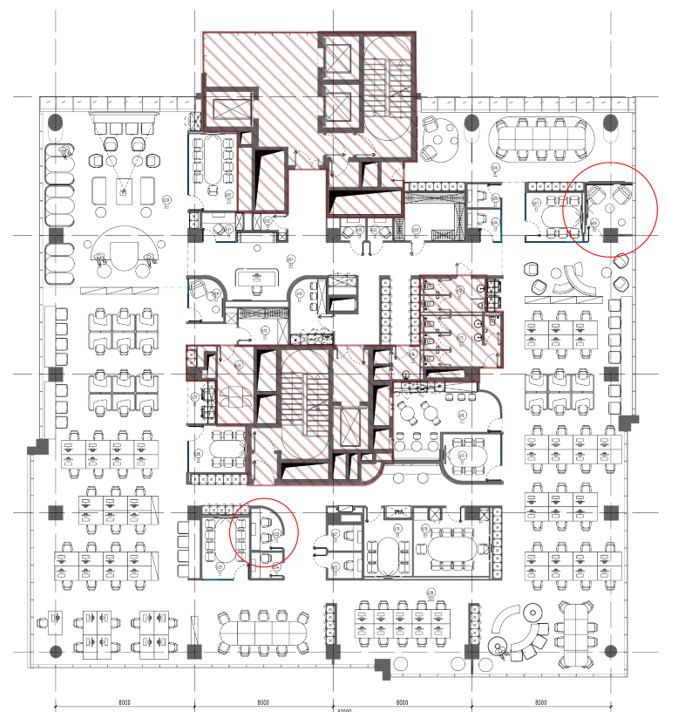
Typical floor plan of our client
Poor performance manifested as employee complaints about:
- unstable connection to the wireless network
- connection drops when moving with corporate laptops across the office territory
- problems with video conferencing and other corporate services
About Client Devices
It must be said that the end devices for all employees were identical laptops in the amount of 1500+ pieces and all observed approximately the same problems.
Before contacting us, the customer made attempts to solve the problem on their own. ИТ department conducted an internal check, during which it found that the network adapter worked unstably when in the corporate network.
Various driver versions for Wi-Fi adapters were tested, an average-best release was found, with which the problems partially decreased, however, it was not possible to achieve serious improvements in device operation.
The Situation in Numbers
Wi-Fi Network Audit and Its Goals
The task set before us by the client was conventionally divided into 2 parts:
As part of the Wi-Fi network performance assessment, the main parameters were subject to verification:
Signal Level (RSSI)
The signal level received by the subscriber device is one of the main qualitative characteristics for a wireless network.
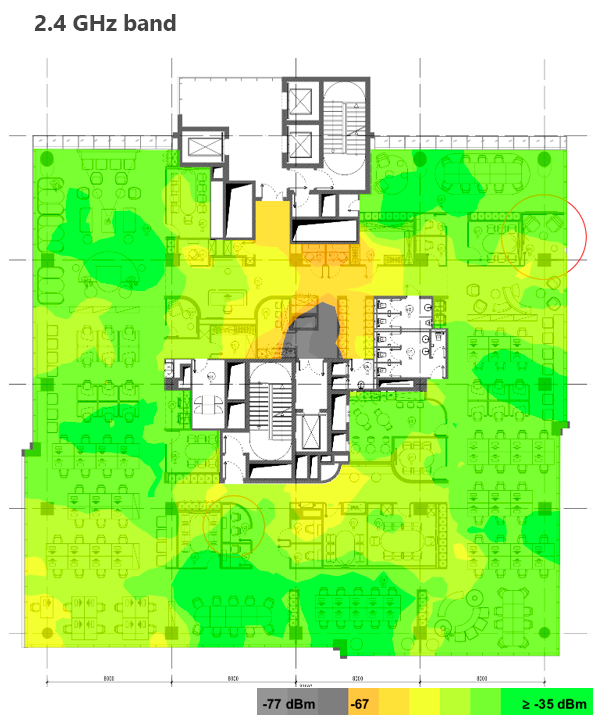
Signal level in the 2.4 GHz range on one of the floors
Signal-to-Noise Ratio (SNR)
How "clean" is the signal, is it affected by interference? One of the key qualitative characteristics of a Wi-Fi network. Signal quality for comfortable work should be at least 30 dB.
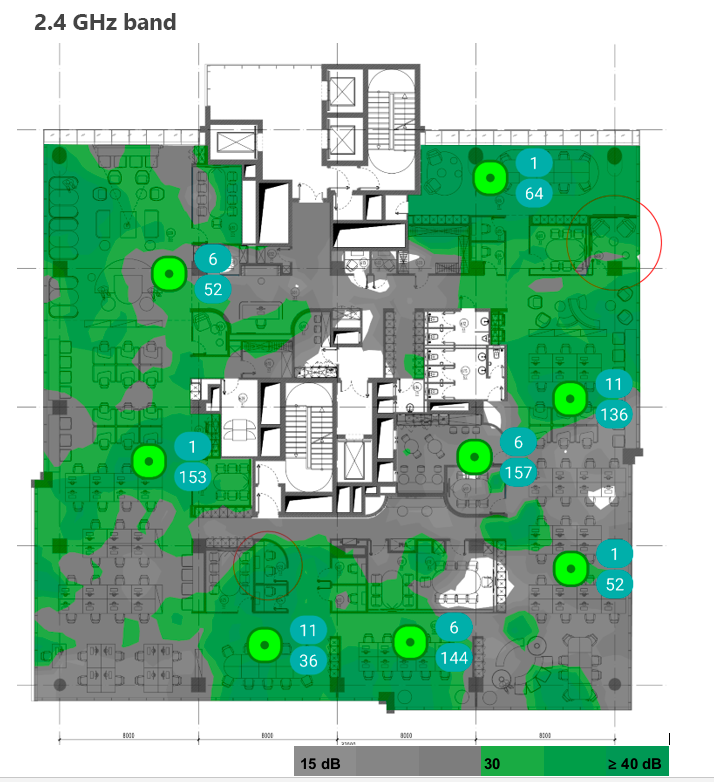
Signal-to-noise ratio in the 2.4 GHz range on one of the floors
Throughput
The need to understand, does the network actually provide the declared speeds?
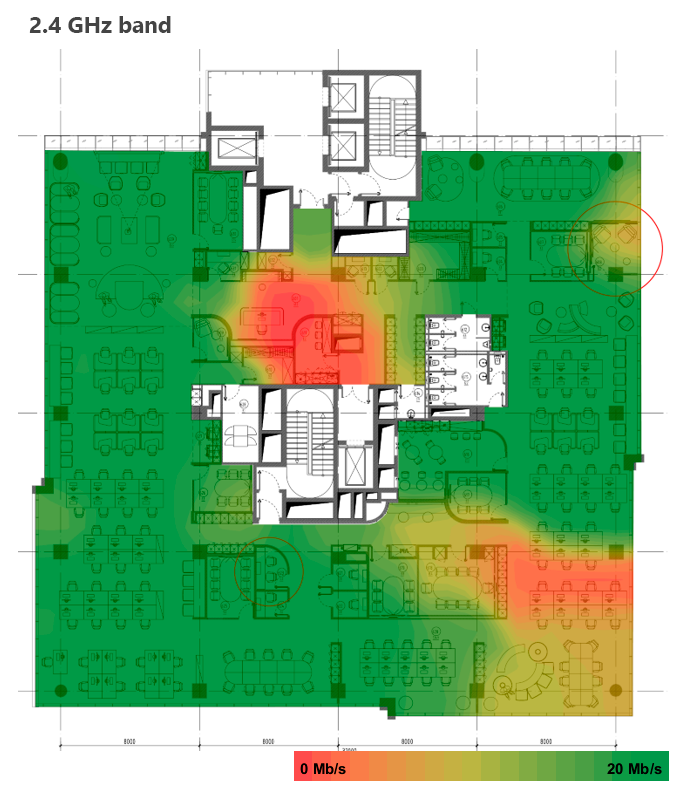
Visualization of throughput in the 2.4 GHz range on one of the floors
Connection Stability
Are there packet losses and connection drops?
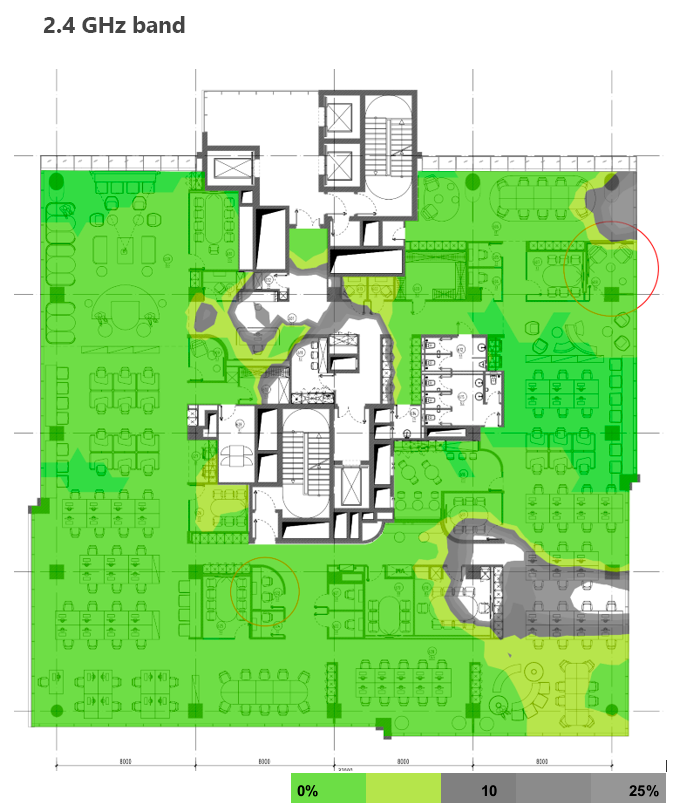
Visualization of packet loss on one of the floors
Correctness of Equipment Configuration
Are the access points and controller configured optimally?
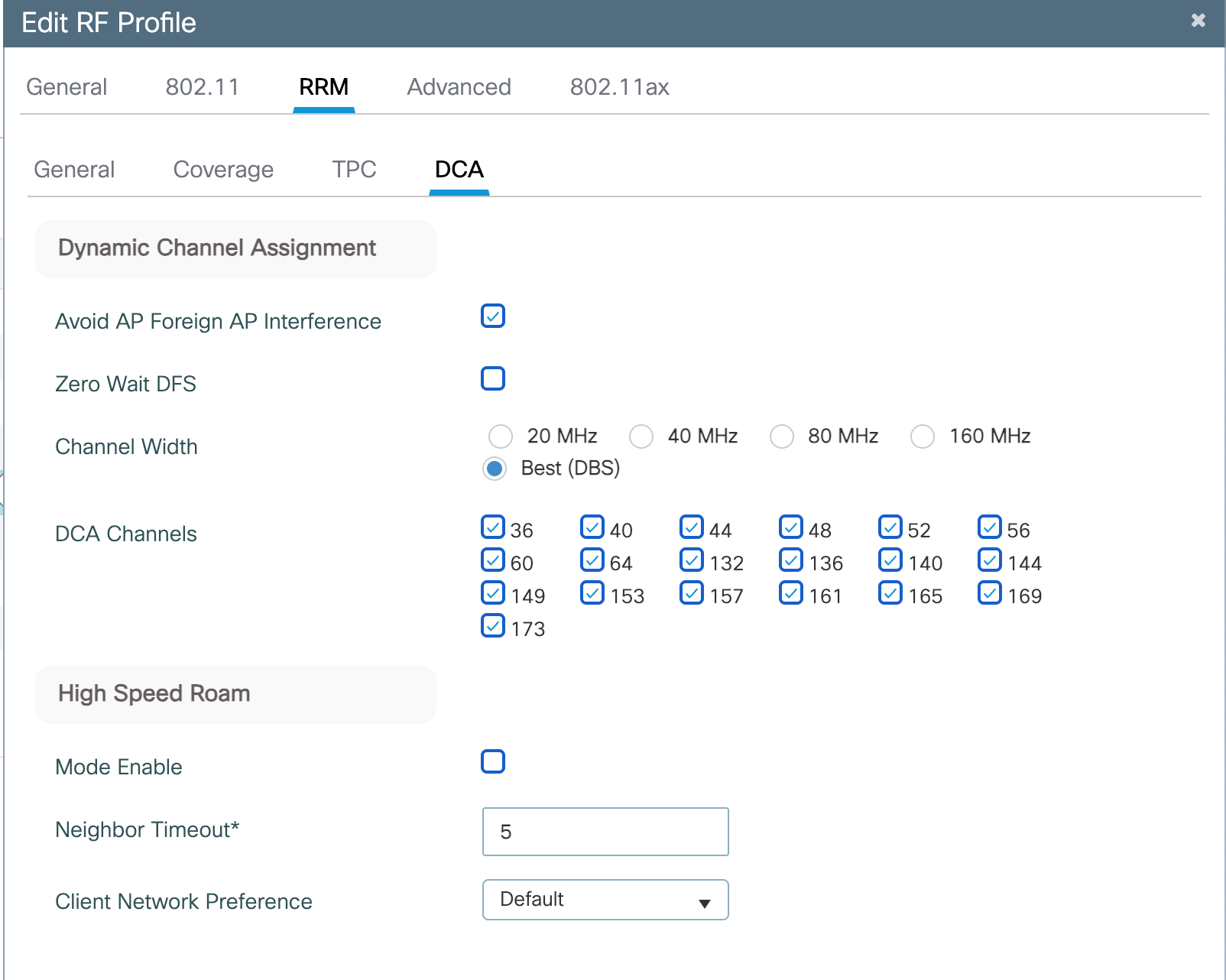
Example of radio interface configuration in the 5GHz range
Audit Methodology
The survey was conducted using professional Ekahau Sidekick equipment and Ekahau Pro software, which is the industry standard for wireless network design and auditing.
Measurements were taken in two modes:
- in passive mode (air scanning)
- in active mode (simulation of a real user's work)
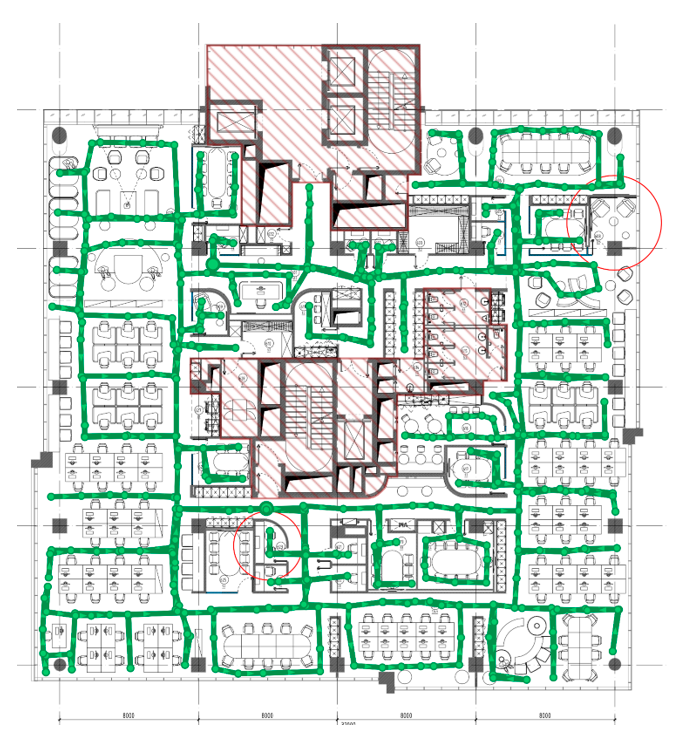
Survey route of one typical floor
What We Discovered: Key Findings
Powerful Foundation, but Suboptimal Planning
The network is built on modern Cisco equipment (C9120AXI access points, C9800 controller). However, the physical location of access points on both floors was not optimal: in some areas they are located too densely, increasing mutual influence, and in others — too far apart.
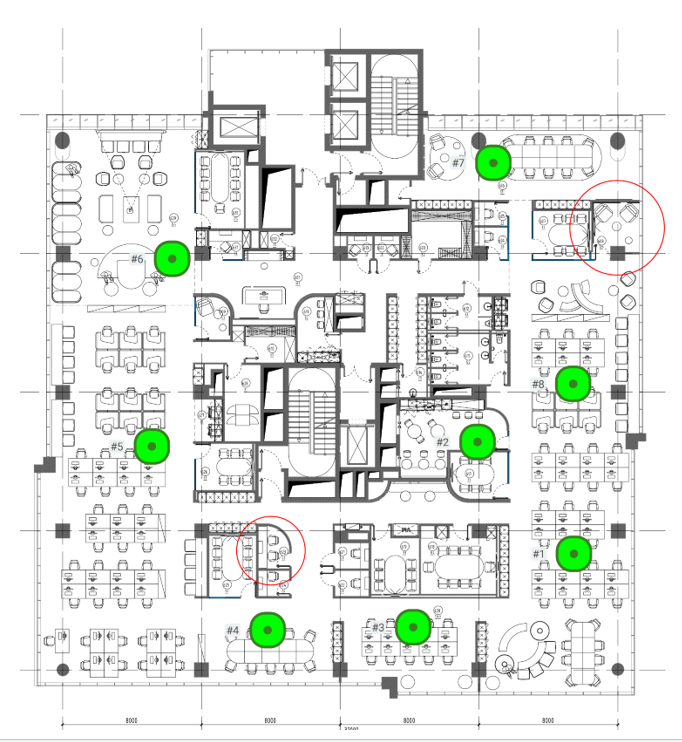
Customer's access point locations
Roaming Issues
Due to uneven signal strength, client devices (laptops, phones) often "stuck" to one access point even when moving around the floor, although there were other, more suitable points nearby that could be used for connection. This led to a decrease in connection speed and stability.
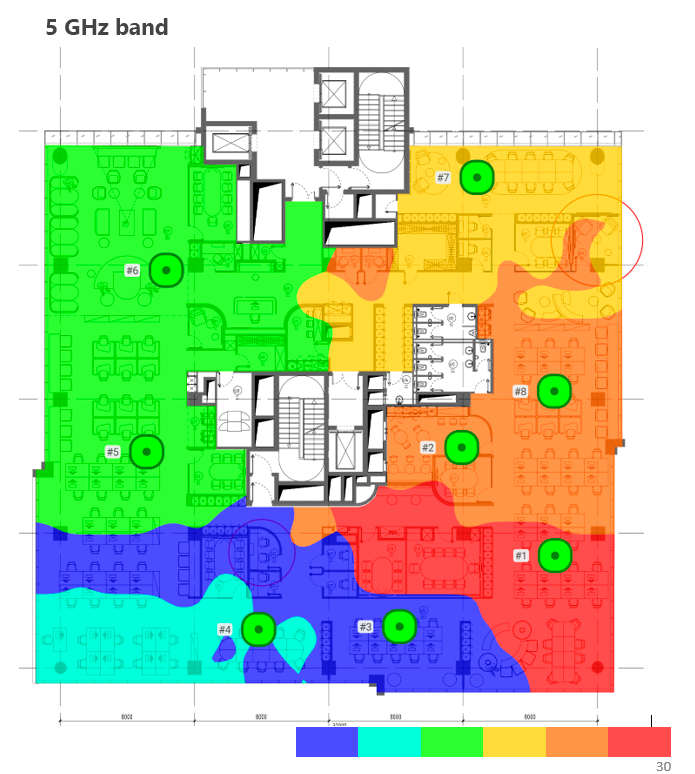
Visualization of client association to access points in the 5 GHz range
2.4 GHz Range — Main Source of Problems
This frequency range is heavily loaded and subject to interference, in most cases, not only from neighboring networks, but also from many household devices (microwaves, Bluetooth devices). Zones with a low signal-to-noise ratio were recorded in it, which negatively affected communication quality.
Incorrect Radio Resource Settings
Low and outdated data transfer rates were enabled, which slowed down the entire network in the 2.4 GHz range. Also, channels not supported by some client devices were allowed in the configuration.
Our Recommendations
Based on the conducted analysis, a set of recommendations for the customer was formed:
Network Redesign
We prepared a new plan for access point placement, which was supposed to ensure uniform coverage across the entire area. It was recommended to add 2 new access points.
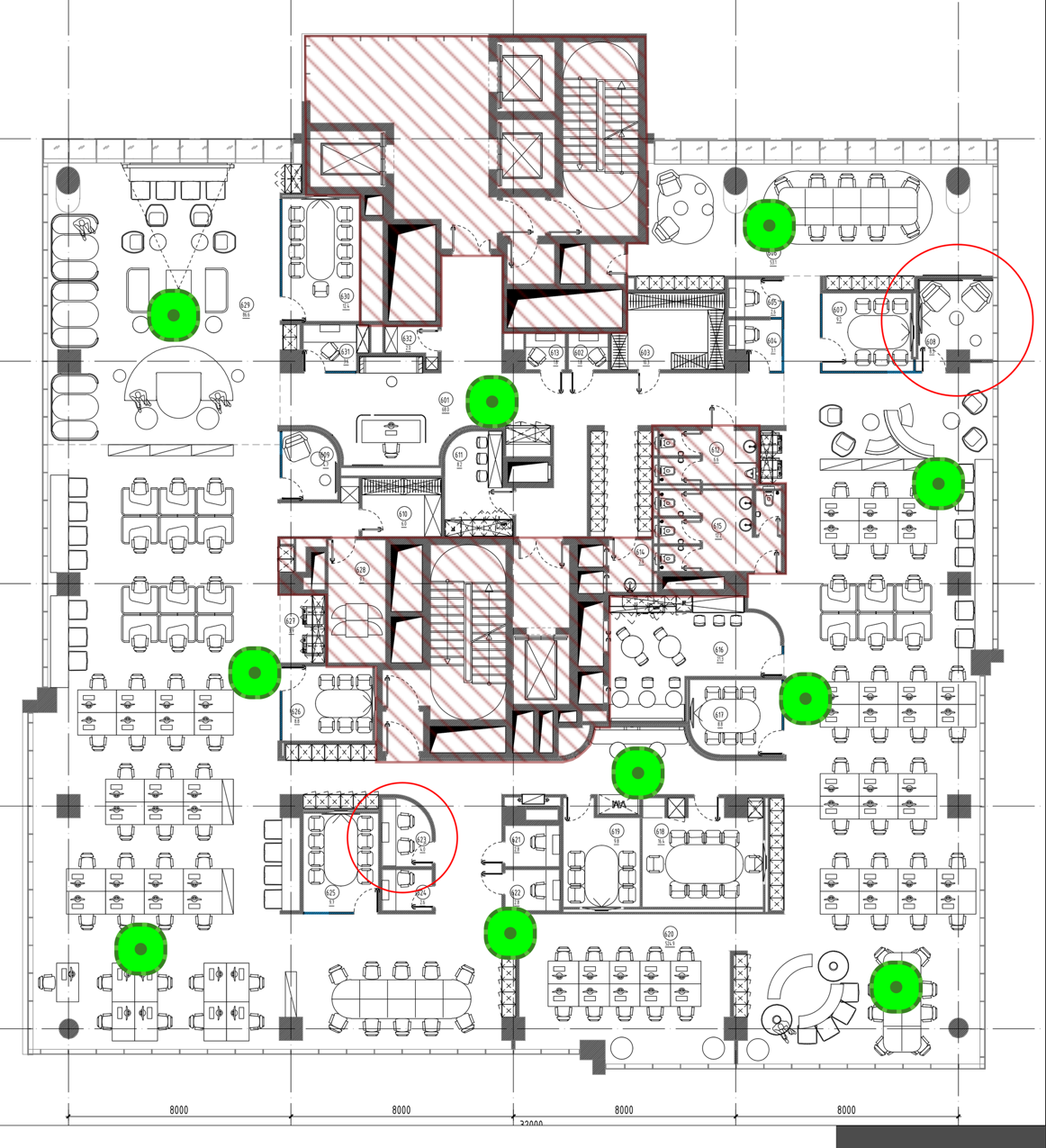
Proposed location of access points
Fine Power Tuning
For each floor, it was necessary to configure individual Transmit Power Control (TPC) profiles to normalize coverage and ensure smooth roaming, since a simple signal increase most often negatively affects network operation.
Settings Optimization
We recommended:
- Disable low data rates (1, 2, 5.5, 6, 9 Mbps) in the 2.4 GHz range.
- Use only those channels in the 5 GHz range that are guaranteed to be supported by all devices.
- Consider the possibility of disabling the Fast Transition (802.11r) function and avoid SSID hiding, which can increase the operational stability of some clients.
Upgrade of Capabilities
The equipment supports the function of converting a 2.4 GHz radio interface into an additional 5 GHz interface using Flexible Radio Assignment (FRA technology). This solution will allow unloading the congested 2.4 GHz range and significantly increase the total network capacity in the 5 GHz range.
 Thus, it was planned to normalize the operation of the entire wireless network and increase the stability of Internet access from subscriber devices
Customer Results After Implementing Recommendations
After relocating access points with the addition of extra units, as well as reconfiguring radio profiles and boundary powers:
- The Wi-Fi network began to work stably
- Technical support requests significantly decreased
- Corporate services began to function without interruptions and handle a large number of subscriber devices
THE AUDIT CLEARLY SHOWED HOW, WITH THE HELP OF NETWORK REDESIGN AND COMPETENT CONFIGURATION, IT IS POSSIBLE TO SIGNIFICANTLY INCREASE THE PERFORMANCE AND FAULT TOLERANCE OF CORPORATE WI-FI

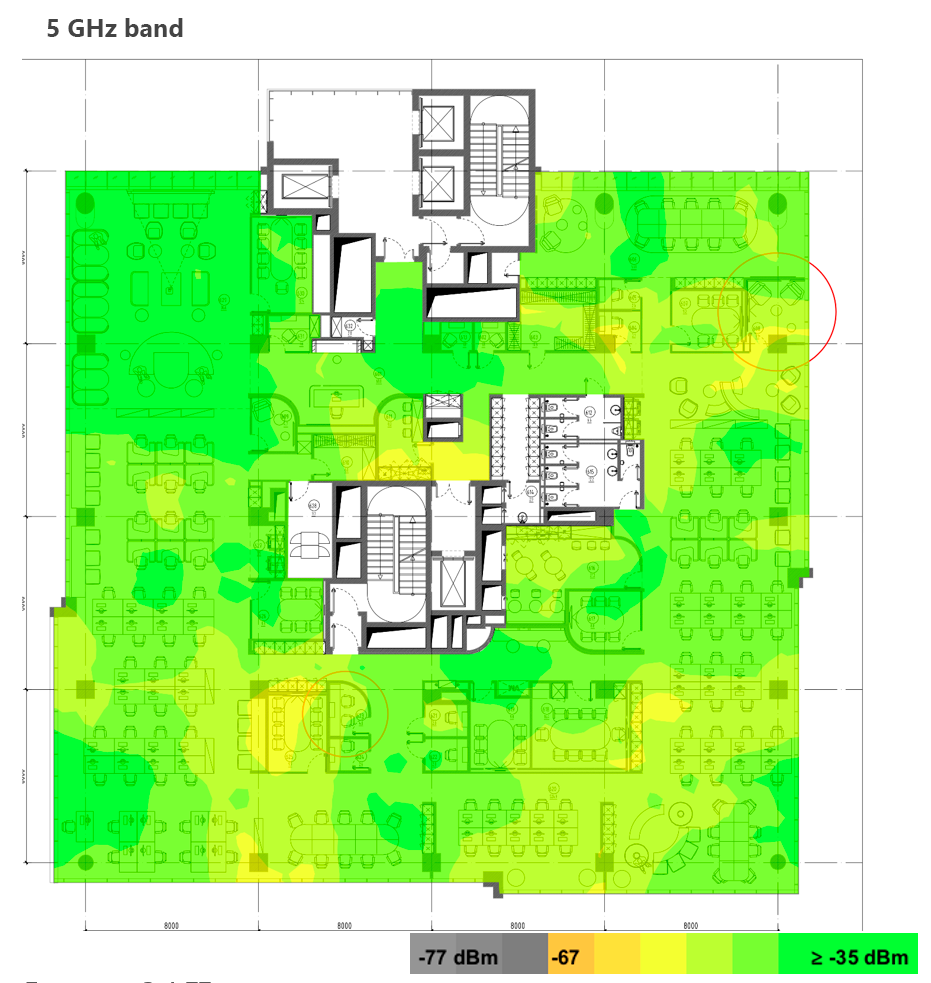
Signal level in the 5 GHz range on one of the floors after applying equipment configuration recommendations
At first glance, it seems that there is more yellow field than green, but in fact, clearer zones from each of the access points were identified by lowering their power. Thereby, we got rid of places where the signal did not reach in the original network configuration.
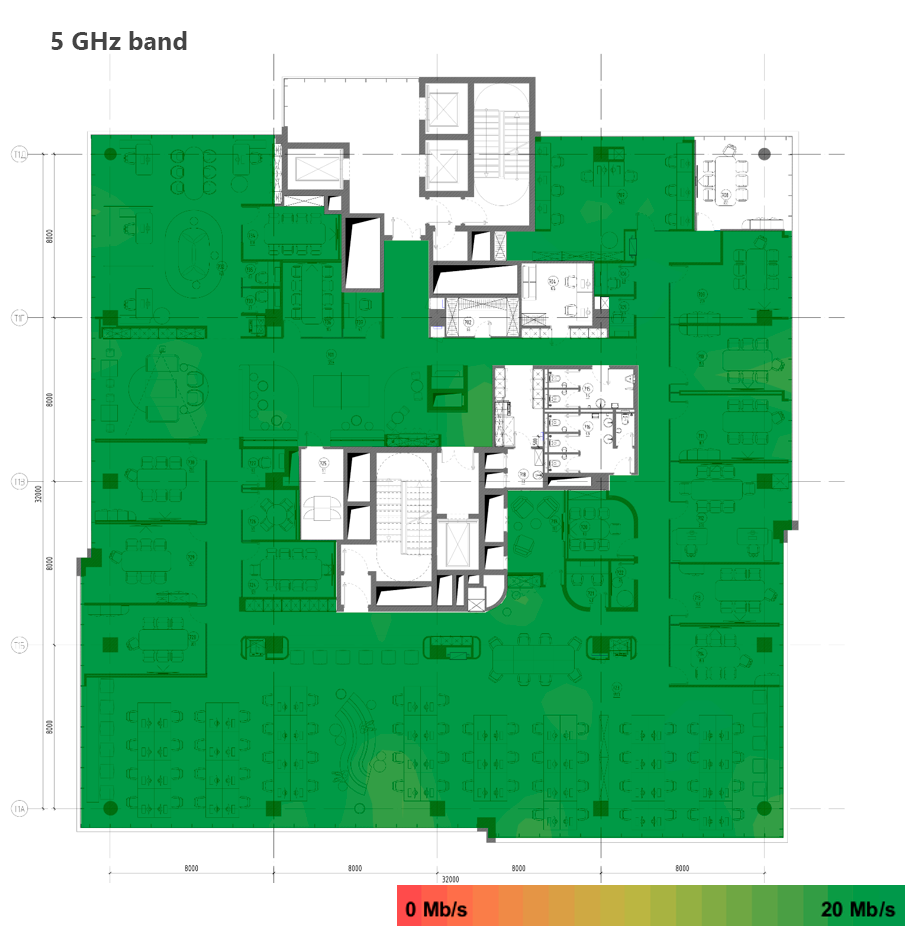
Network throughput in the 5 GHz range after applying equipment configuration recommendations
Data transfer became more stable, which eliminated spontaneous device disconnections from the network.
Back to Corporate Laptops
Despite the optimized wireless network parameters, client devices continued to connect to 2.4 GHz even with a stable 5 GHz signal and use access points inefficiently.
For this task, an elegant solution was found – we found a corresponding setting in the network card driver that allowed forcing the laptop to connect exclusively to the 5GHz frequency and operate at the maximum possible speed.
Our customer's IT department centrally distributed this rule to the entire fleet of devices, which completely eliminated the problem.
Conclusion
The project demonstrated the importance of proper planning and regular auditing of the wireless network for organizations. In this case, the customer managed without significant financial investments in Wi-Fi reorganization.